

Saved bank accounts
Link a bank account for ACH — instantly through Plaid or manually with a micro-deposit — and reuse it for future payments.
The Payments portal lets you link a bank account once and reuse it for future ACH payments. You can link an account two ways: instantly through Plaid, or manually by entering your bank details and verifying with a micro-deposit. After linking, the account is saved on your profile and ready for any future payments.
You do not need to do anything special if your only payments are by card. This page is only relevant if you plan to pay by ACH (which is usually a good idea, since ACH fees are significantly lower).
Why link a bank account?
Linking a bank account:
- Verifies that the account belongs to you, which prevents fraud and lets the dealer trust the source of funds.
- Lets you pay by ACH instead of card, which usually has much lower fees.
- Saves the account for next time, so the next ACH payment is one click instead of re-entering bank details.
Step 1: Start an ACH payment
From the Pay page, pick what you want to pay and select ACH as the payment method. If you do not have a bank account linked yet, the portal will prompt you to add one before the payment can be submitted. You will see two choices:
- Instantly add bank account (labeled Recommended) — links through Plaid; no micro-deposit needed.
- Manually add bank account — enter your bank details, then verify with a micro-deposit.
Option A: Instantly add a bank account through Plaid
Plaid Link is a secure flow operated by Plaid, a third party that connects to banks across the United States. The flow walks you through:
- Picking your bank from a list.
- Signing in to your bank's site through Plaid's interface.
- Selecting which account at that bank to link.
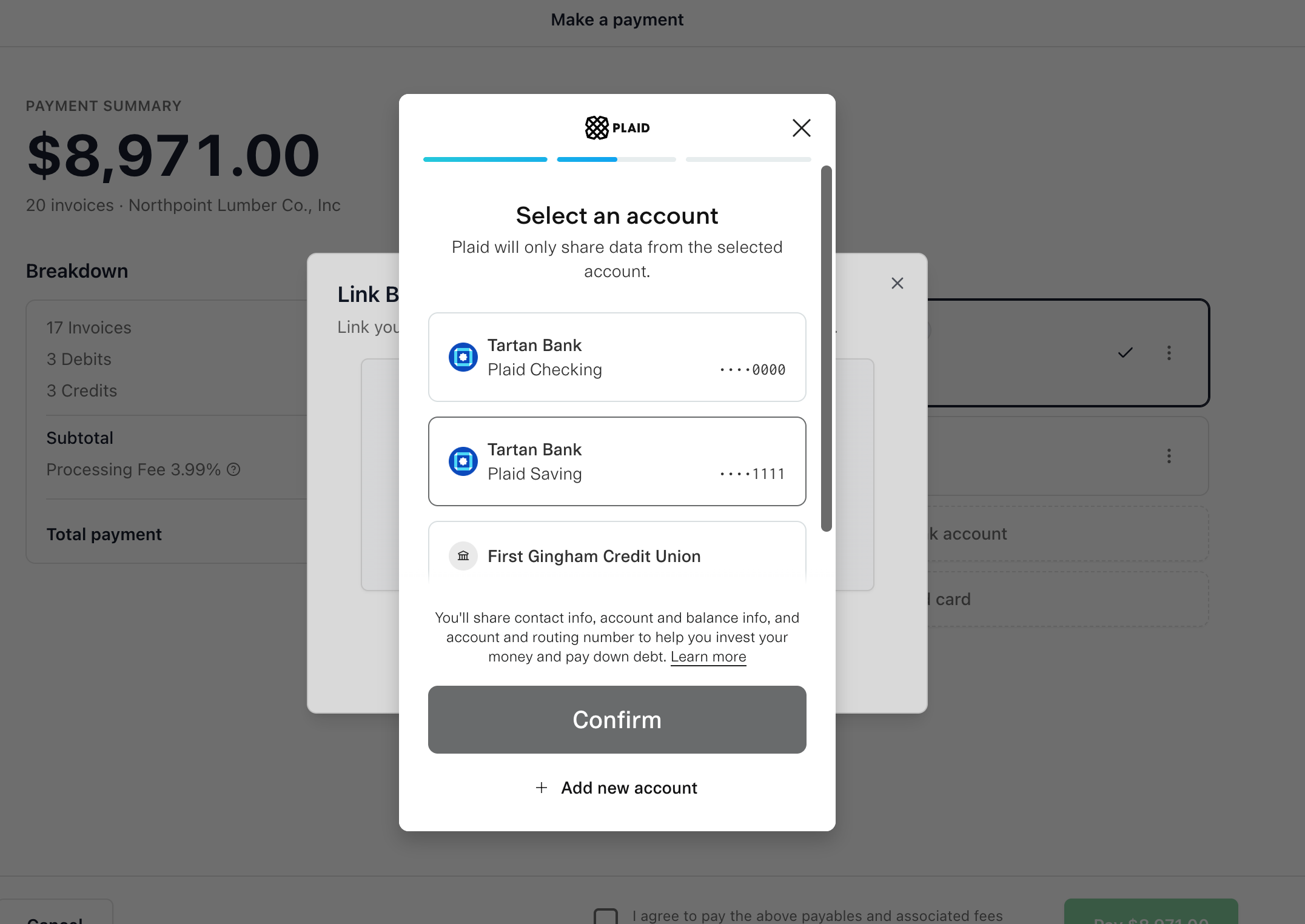
Plaid will ask you to sign in to your bank — this is an expected, normal part of the flow, not a red flag. Your bank login goes to Plaid and your bank, never to Drypowder or your dealer. Drypowder does not see your bank credentials; Plaid returns a secure token that the portal uses to draft ACH payments. A Plaid-linked account is ready to use right away — there is no micro-deposit step.
Option B: Manually add a bank account
If you prefer not to use Plaid, choose Manually add bank account and fill out the form:
- Account Holder Name
- Account Holder Type — Individual or Business.
- Routing Number — 9 digits; the portal looks up and displays the bank name automatically.
- Account Number
- Account Type — Checking or Savings.
Click Add Bank Account to save it. A manually added account must be verified with a micro-deposit before you can pay with it (see below).
Verify a manually added account
- Click Start Verification. Drypowder sends a $0.01 deposit to the account.
- The deposit arrives with an MV#### code in the transaction description. ACH can take up to 2 business days for the deposit to land.
- Once you see it, return to the account and enter the code in the Verification Code field, then click Verify Account.
A few things to know:
- You get up to 5 attempts to enter the code.
- The verification expires after 14 days if not completed.
- You can choose Complete Later and finish the verification when the deposit arrives.
- If verification fails, use Remove Account to delete it and add it again.
Finish your payment
Once the bank account is linked (and verified, if added manually), the portal returns you to the payment preview with the new account selected as your payment method. Review the total and submit as usual.
Linked accounts on future payments
The next time you pay by ACH, the linked account shows up as a payment option on the preview. You can pick it directly without linking again.
Manage your saved accounts
You manage your own saved payment methods — you do not need to contact your dealer.
- Remove an account — use the Remove action on the payment-method list to clear an account off your profile.
- Set a default — use Make primary to mark an account as your default; it then shows a Primary badge and is preselected on future payments.
What if linking fails?
A few common reasons Plaid Link can fail:
- Your bank requires multi-factor authentication and the verification code timed out. Try again and respond to the code promptly.
- Your bank account does not support ACH payments (rare, but it can happen with some account types).
- Network or connectivity issues. Retry on a stable connection.
If Plaid will not connect to your bank, add the account manually instead and verify it with a micro-deposit. If a manual verification fails, use Remove Account and re-add the account. You can also pay by card while you sort out the bank link.
Related
- Pay an invoice — Walk through a payment end to end.
- Payment methods — Detailed comparison of ACH and card.